Lutter contre l’ignorance, le fanatisme, l’intolérance. Toujours, sur Internet comme ailleurs


Jan 07
Sep 25
 C’est tout à fait la représentation de la parole politique d’aujourd’hui. Que du déchet, des mensonges pour se faire élire, de la manipulation d’opinion. Rien de concret … Pour en voir plus :
http://lavue.fr/ces-29-dessins-intelligents-vous-feront-vous-poser-des-questions-sur-tout-ce-qui-va-mal-dans-le-monde/
Sep 23
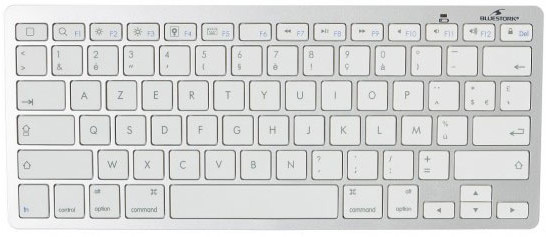
Voici les drivers pour le clavier Français Bluetooth de Bluestork pour MacOSX : bs-kb-micro-bt-fr.keylayout
A décompresser puis à copier dans le dossier /Bibliothèque/Keyboard Layouts/ sur le disque système.
Réalisé avec l’excellent logiciel pour macosx : Ukulele – the Mac OS X Keyboard Layout Editor
Sep 21
 As for now (September 2014), 1&1 still use Mysql server 5.1.73.You can’t use Moodle 2.7 because it need Mysql server 5.5.31.
First, you need to go to https://download.moodle.org/releases/supported/ and download the lastest 2.6 version of moodle.
Decompress it on your htdocs directory and create a new directory at htdocs root : moodledata.
Protect the moodledata dir by putting inside a little .htaccess file that contain :
order deny,allow
deny from all
Then chmod 700 moodledata
Edit file moodle/install.php with nano. Search with Ctrl-W for “dataroot_insecure”. Then change “while(is_dataroot_insecure()) {” to “while(FALSE) {” two times.
Go to : “www.mywebsite.com/moodle/”.
Choose your newly created datadir “/homepages/xx/xxxxxxxxxxxx/htdocs/moodledata”.
Some time after, configure your database like this :
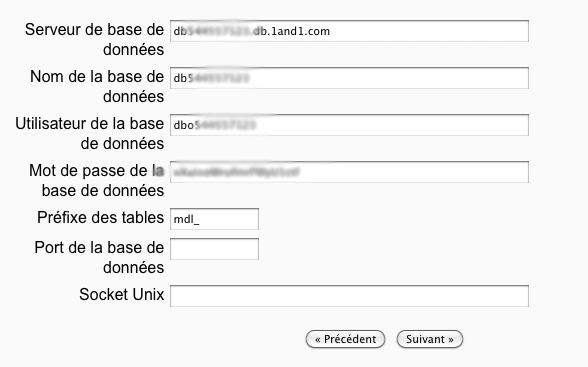 The hard part is done. Just continue to the end of the installation.
Do not forget to renew your : ” chmod 700 moodledata” because moodle put 777 on it. Silly moodle !
Ooh no ! It’s still not working at all .. No icons in moodle, dead menu links !!!
Log into Moodle and go there directly with the URL:
http://yourserver/admin/settings.php?section=http
Untick the top box for slash arguments and save. Hopefully all of your pictures and links should then start working.
Do not forget to add a cron job like this :
/usr/bin/php5.5 /kunden/homepages/xx/dxxxxxxxx/htdocs/moodle/admin/cli/cron.php >/dev/null
Have Fun with your new 1&1 moodle.